



Live Streaming Encoder Software and Hardware: Options Compared

By Dacast Editorial Team | Reviewed by Jon Whitehead, COO at Dacast | Updated October 2026.
A live streaming encoder converts your camera feed into a digital stream that can be sent to a streaming platform, and the one you choose has a direct effect on the quality your audience sees. Lagging video and shaky audio distract from your message, so the encoder deserves as much attention as your camera.
Encoding software allows broadcasters to focus on producing engaging content for their audience by handling the technical aspects of encoding and transmission.
Encoding your video content, which is converting raw video files into digital ones, is essential to maintain professional quality. That requires a dedicated live streaming encoder, which can come from hardware or software.
This guide compares live streaming encoder options, from free software like OBS Studio to hardware devices for remote production, and shows how to choose. For the basics, see our guides to video encoding and transcoding.
TL;DR: A live streaming encoder converts a raw camera feed into a digital stream that can be sent to a platform over RTMP, SRT, or WHIP. Hardware encoders suit reliability and remote or field production, while software encoders suit flexibility and lower cost. OBS Studio is a free starting point, vMix and Wirecast suit advanced productions, and LiveU Solo and Teradek suit bonded mobile streaming.
Table of Contents
- What is a Live Streaming Encoder?
- Hardware vs. Software Encoders
- Live Streaming Encoders Compared
- How to Choose a Live Streaming Encoder
- FAQs
- Conclusion
What is a Live Streaming Encoder?

A live video streaming encoder is a tool that converts video content into a different format. The purpose of encoding a video is to create a digital copy of your own video source that can be transmitted over the internet. Digital video content can be embedded or streamed live right on your website. Encoders can manage multiple types of sources, including audio sources, window captures, and browser windows, and allow users to add new sources as needed for their live production.
Live streaming is time-sensitive, so the encoder has to process your video feed as it comes in. Many professional broadcasters use hardware encoders for reliability, while beginners and mid-level broadcasters often choose software because of the lower price.
Broadcasters have the option to choose between a hardware or software encoder. Which way you go will largely depend on the purpose of your stream and what sort of budget you are working with.
Most professional broadcasters will go with a video hardware encoder, but since HD live streaming encoders come with a high price point, most beginner to mid-experienced broadcasters go with live streaming encoder software.
Hardware vs. Software Encoders
Hardware encoders are dedicated devices built only for encoding, which suits reliability and field production. Software encoders run on your computer alongside other tasks, which makes them flexible and affordable. Hardware encoders typically start around $600, while software is often under $100 or free. Many broadcasters use both as they grow. For a full comparison, see our guide to [software vs hardware encoders](https://www.dacast.com/blog/software-vs-hardware-encoders-for-live-video-streams/), and for device recommendations, see our guide to hardware encoders for RTMP, HLS, and SRT.
Live Streaming Encoders Compared
There are several live streaming encoders available today. Each is equipped with unique features and functionality at different price points.
To determine which is the right video streaming encoder, you have to consider your unique goals and needs. Good encoding software offers a wide array of configuration options, the ability to create scenes with multiple sources, customizable transitions between scenes, and features to duplicate existing sources or scenes for efficient setup. As you compare video encoders for live streaming, you’ll want to ask yourself:
- Is the encoder compatible with my streaming platform?
- What features does the encoder provide? Does it fit my broadcasting needs?
- What’s my budget?
Keeping those questions in mind, let’s explore the video encoders available for major streaming platforms. In this article, we’ve reviewed live streaming hardware and software encoders so you can choose the streaming video encoder software that fits your needs. The list also includes both free and paid encoders, so you can choose one based on your encoder budget.
1. Wirecast
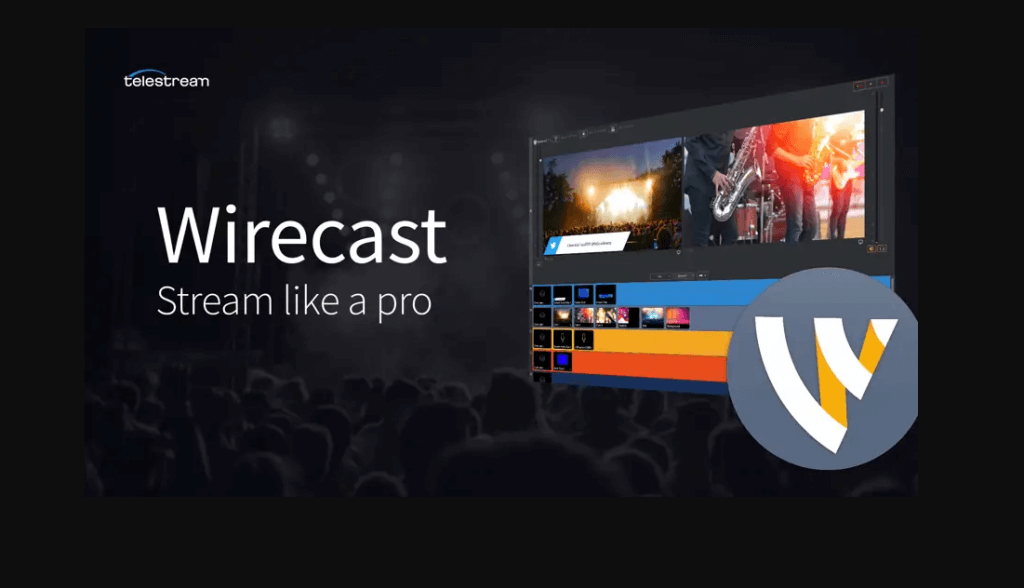
Wirecast is an accessible, capable encoding software from the company Telestream. It’s available on Windows PCs and Macs. Wirecast includes regular updates and a wide range of features, from instant replay to integrated video conferencing. Wirecast is available in two versions: Studio and Pro, which includes additional functionality.
Basic Functionality:
Wirecast supports live video compositing via a “layers” architecture similar to many graphics programs. The encoder facilitates live switching, picture-in-picture composition, titles, audio delay, and many other fine-tuning compositional elements.
Wirecast’s streaming encoder software makes it easy to incorporate pre-recorded video content into your broadcast. It also supports the encoding of HD and SD sources for streams broadcast simultaneously to multiple servers and platforms.
The Wirecast Pro enhanced program adds several other specialized features, including:
- Replay
- Live scoreboards
- Virtual 3D
- Use of IP cameras and web streams
- 8-track audio output
These advanced features of Wirecast Pro make it a better choice than the basic Wirecast program for most live-streamed events. With all those features, Wirecast’s biggest downside may be the price. To start, you can download a free trial version of the basic software.
Key Features:
- Input sources from cameras, mics, webcams, IP cameras, capture cards, and desktops
- Ideal for sports: instant replay, scoreboards, clocks, and timers
- The free wireless camera app allows you to use any iOS device as a video source
- NDI support
- Graphics and titling tool
- Audio mixer and up to 8 audio tracks
- Built-in video conference tool
- Stream to more than one destination simultaneously
- Support for MIDI hardware controllers
- Stream and record simultaneously, with re-stream and live caption options
- Multiple bitrate streaming
- Integrates with Facebook Live and Twitter for sharing comments on-screen
- Includes instant replay, scoreboard, and timers for sports
- Integrated video chat via “Wirecast Rendezvous”
- Local program output
Pros:
- Easy-to-use, user-friendly platform
- Compatible with most popular operating systems
- Fully loaded with valuable features
Cons:
- High price point
- Many features are locked in the “Studio” version
- It consumes a lot of computer memory
Pricing:
The software comes in two versions:
- Wirecast Studio for enhanced live production & streaming: $34/month
- Wirecast Pro for advanced live show and streaming: $42/month
2. OBS Studio
OBS Studio is a free and open-source option that’s a good fit for beginning live streamers. It’s expandable with various plugins and has a robust community for support and questions. It is supported on Mac, Windows, and Linux PCs.
OBS Studio supports all major streaming platforms including YouTube, Twitch, and Facebook, and can stream to any RTMP-supporting destination. It features a modular ‘Dock’ UI that allows users to rearrange the layout as desired, and each individual dock can be popped out into its own window, allowing users to fully customize their workspace for efficient work. Users can set up an unlimited number of scenes by adding new sources such as window captures, browser windows, images, webcams, and more, and can duplicate existing ones, sources or scenes, for efficient setup and streamlined workflow. OBS Studio supports different and customizable transitions, and users can import their own stinger video files to create unique scene transitions and enhance production quality. Users can easily cue scene changes for a professional production. OBS settings provide comprehensive options to configure video, output, and audio, enabling users to optimize stream quality and performance.
Formerly known as Open Broadcaster Studio, it is an open-source platform with encoding capabilities. This software encoder and comparison are based on the latest OBS Studio Version 31.0.1. This professional video streaming and broadcasting software is available for macOS 10.13 or newer, and Windows 8.1, 10, and 11 operating systems. For the Linux version, FFmpeg is required.
Basic Functionality:
OBS Studio offers many great features for new broadcasters just getting the hang of live streaming. The software has a set of OBS-specific settings and system requirements to support a smooth live broadcasting experience.
Advanced features of this streaming encoder software include:
- Real-time video/audio capturing and mixing
- Unlimited number of scenes and custom transitions
- Intuitive audio mixer
- Modular “Dock” UI
Key Features:
- HLS Live streaming and recording functionality
- Audio and video mixing, filters, and transitions
- Support for hotkeys
- Chroma key/green screen support
- Scenes allow you to prepare overlays in advance for rapid switching
- Support for a wide range of video, audio, and image sources, as well as screenshots
- Expandable via plugins to add NDI functionality, remote control via WebSockets, advanced scene switching, and more
- OBS Studio does not natively support multiple bitrates unless you add a plugin or third-party service.
- Detailed wiki and highly active user forum for support/help. Many YouTube tutorials are available as well
Pros:
- Free to use
- Works with most OVPs
- Works on Windows, macOS, and Linux. FFmpeg is required on Linux
- It is open-source for ongoing development and crowdsourced improvements
- Great for beginners
Cons:
- Can be heavy on CPU and memory
- Multi-bitrate output needs a plugin or third-party service
Pricing:
OBS Studio is free to use for everyone and has a working integration with Dacast. Dacast has developed a customized version of this video encoder software. See for yourself in this tutorial video.
OBS Studio works well as encoding software alongside a professional online video platform. Check out our how-to live stream with the OBS Studio video tutorial for more information.
3. VidBlasterX
Like Wirecast, VidBlasterX is a professional-grade streaming encoder software.
This company offers three packages: VidblasterX Home, VidBlasterX Studio, and VidBlasterX Broadcast. The main difference between each version is the number of modules each supports. Each successive module also adds additional advanced features for professional broadcasters.
VidBlasterX Home is an essential product. It supports up to seven modules. VidBlasterX Studio has several features for studio production of videos (hence the name) and allows for more versatile videos. The Studio version supports HD and television-quality full-screen output and community support.
VidBlasterX Broadcast incorporates all the features of VidBlaster Studio, adds more module capacity, and is recommended for professional broadcast studios. With Broadcast, you get direct email support from the developer.
The Broadcast edition also supports UDP streaming, multiple streaming sources, and recorder modules in a single profile, and includes priority support.
Basic Functionality:
VidBlasterX is an encoding software organized into a series of modules, which can be added, removed, and rearranged on multiple screens as needed.
Key Features:
- Modular user interface
- Includes macro and scripting functionality to automate or hot-key actions
- Supports overlays and lower thirds
- Chroma key support
- Live streaming and recording up to 4K resolution
- Compatible with social media platforms and most OVPs (including Dacast)
- Audio mixer
- Multiview support
Pros:
- Has plans for a wide range of budgets
- Feature-rich
- Easily customizable
Cons:
- Not compatible with macOS
- Not well-suited for inexperienced live streamers
- Slightly complex
Pricing:
VidBlasterX is available in three versions. Each of the following options is priced with an annual subscription model:
- Studio: $99/year; supports 25 modules.
- Broadcast: $999/year; supports 100 modules. This version also supports multiple recorder & streamer modules in a single profile.
- Broadcast 4K UHD: $4,995/year; Broadcast 4K edition also supports UHD & 4K video output resolutions. The (free) trial edition is equal to the Broadcast 4K edition with a watermark added to all output channels
The difference between the versions is the number of simultaneously active modules you can have.
4. vMix
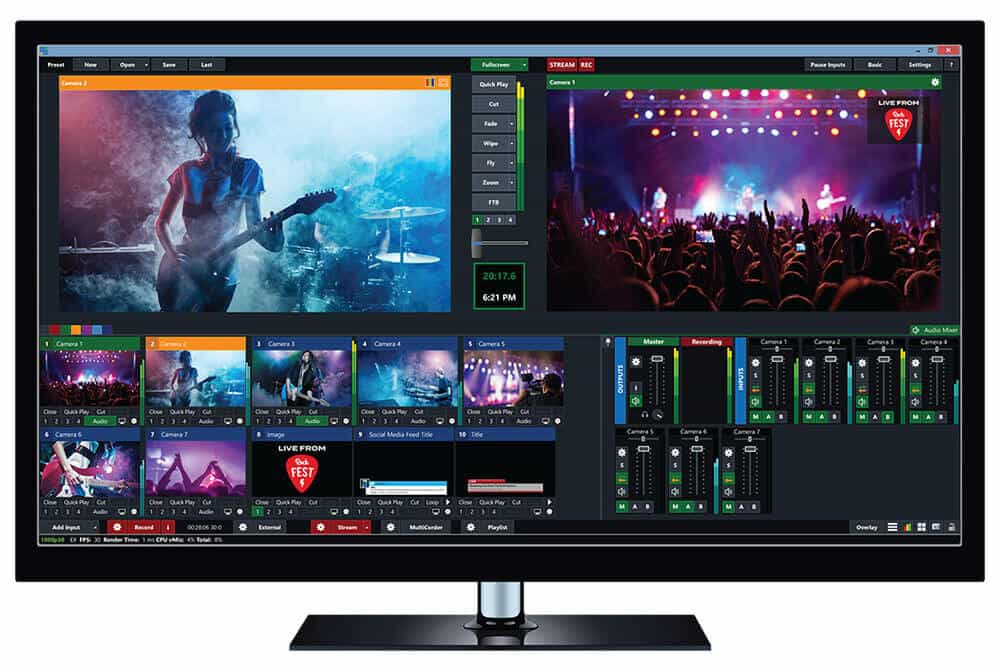
vMix is another 4K live streaming encoder. This Windows-specific live video streaming encoder software has all the tools that broadcasters need to support their streaming setup.
This Australian-based live production and encoding software is a strong option for professional productions.
vMix includes a free 60-day trial of vMix Pro. vMix runs on Windows only and does not run natively on Mac. Boot Camp is not available on Apple Silicon Macs.
Basic Functionality:
vMix offers an array of video streaming tool plans. They offer a wide range of features at different price points, so there are options for broadcasters of every level of expertise. vMix offers robust encoding services.
Key Features:
- Support for a wide range of inputs including webcams, cameras, capture cards, DVDs, sound cards, playlists, photos, PPT presentations, and more
- NDI support
- Chroma key and virtual sets
- Built-in titling tool that supports animation via XAML
- Live streaming platform integrations (including with the Dacast streaming platform)
- vMix Social allows you to pull and display content from popular social media platforms
- Instant replay, slow motion, and scoreboards
- Training videos available
- vMix “reference systems” ease the difficulty of building a custom live production system
Pros:
- Many features
- Reliable customer support
- Professional platform
- Added speed for specialized codecs
Cons:
- A high price point for most inclusive plans
- It only works with Windows
- A bit tricky to use
Pricing:
vMix is available for Windows computers only, and it comes in five different editions. Each purchase never expires, and all editions include free updates for a year. The versions are:
- Basic HD: $60, which supports four inputs (up to 3 camera/NDI) and video up to Full HD 1920×1080 resolution
- HD: $350, which supports 1,000 inputs, adds vMix call functionality, four overlay channels, and supports full HD video in 1920×1080 resolution
- 4K: $700, which supports 1,000 inputs, 4K resolution video (4096 x 2160), PTZ control, two recorders, instant replay, 4 SRT outputs, and much more
- Pro: $1200, which also supports 1,000 inputs, includes all 4K features and 2 records, plus up to 8 callers, up to 4 cameras for instant replay, and 4 SRT outputs
The following is a subscription license that includes, and is charged every month:
- MAX $50/month, which also supports 1,000 inputs, 1,000 NDI inputs, and includes all 4K resolution video (4096 x 2160), PTZ control, 2 recorders, instant replay, 4 SRT outputs
vMix also offers a 60-day free trial and has all the features of vMix Pro, including the ability to use resolutions greater than HD such as 4K, mainly to ensure vMix supports your computer hardware and work with it before purchasing. It is a great perk, as most encoding software offers only up to a 30-day free trial.
5. LiveU Solo
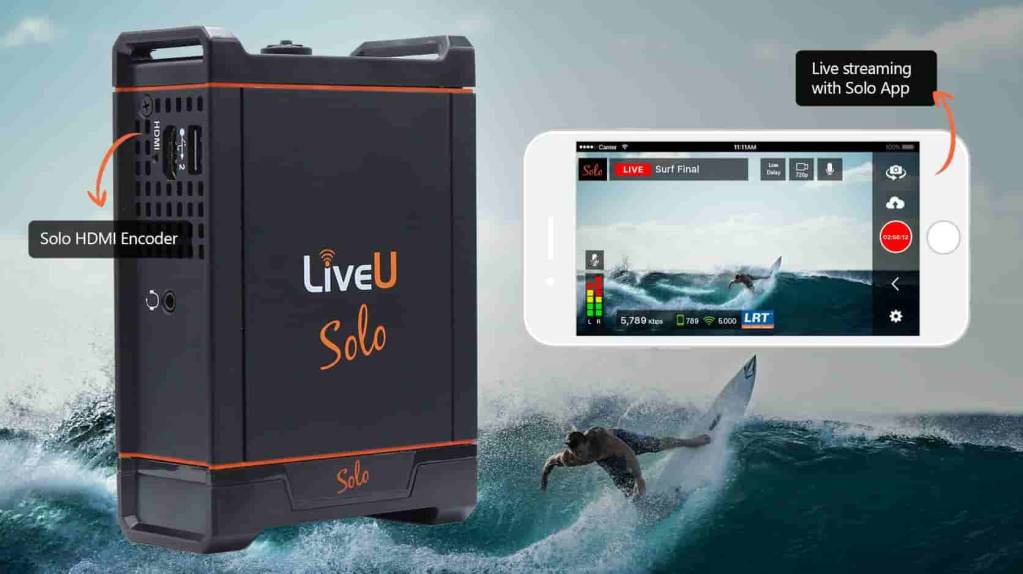
The LiveU Solo is a highly capable hardware encoder for live streaming that is well-suited for encoding and producing remote streams. It is a portable device that supports up to 5G 4K HEVC streaming.
The hardware encoder offers up to 20 Mbps streaming and combines with up to six IP connections to ensure uninterrupted live streaming experiences for your viewers. This is something that sets it apart from software encoders like Open Broadcaster Studio (OBS), vMix, and Wirecast. It also offers optional HEVC/H.265 encoding that enables you to get the same quality for half the bandwidth.
Key Features:
- Seamless integration with modems and cellular data
- Robust remote streaming
- Lifetime support
- Responsive bandwidth consumption for uninterrupted streaming
- Boost up to three connections at once
- Easy set-up
- Preview display is a handy feature
- Long battery life, 2+ hours
Pros:
- Suitable for live event streaming
- Team friendly
- Supports network bonding
- Geared towards remote streaming
- Great customer service and user support
- High-quality video
Cons:
- Can get a bit complicated
- Access to some basic features requires a hardware upgrade
- Expensive upgrades
- UI could use some improvement
- Bonding service needs separate purchasing
- Doesn’t support USB modems well
- Some issues with streaming to social media platforms
Pricing:
LiveU Solo’s pricing is based on location. In the USA, the device costs $995. Please check out their pricing page to see how much this video encoder for live streaming costs in your region.
6. Teradek
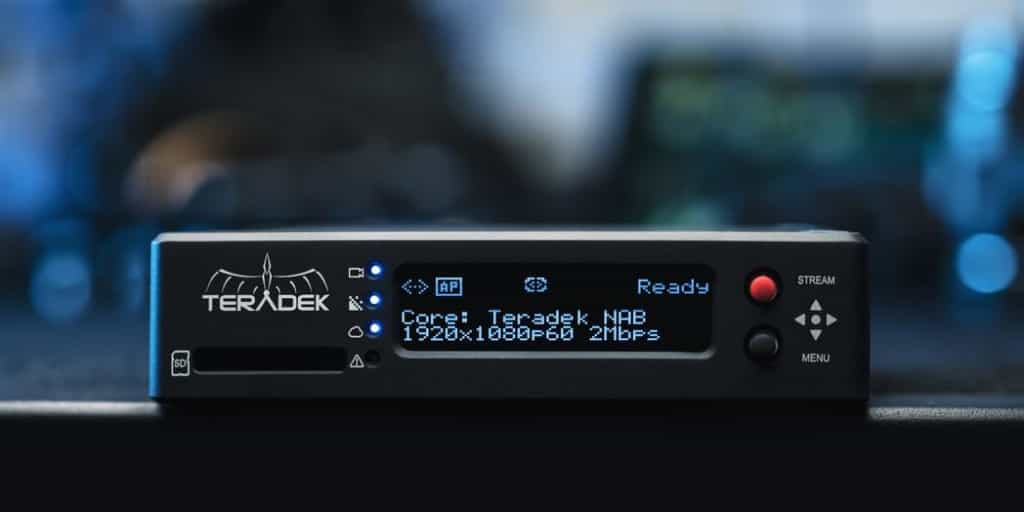
Teradek offers compact encoding hardware called Prism that is designed for live streaming on the move. Unlike many other hardware encoders on the market, their products are light and sleek. Some are built with portable chassis for remote location streaming.
Basic Functionality
Teradek’s hardware encoding products are designed for portability and streaming on the move.
Key Features
- Sleek design
- Top-tier video quality
- High-quality wireless transmission
- Extended range
- HDR and color accuracy
Pros
- Designed to live stream on the go
- High-quality video
- Compact and portable
- User-friendly setup
Cons
- High price point
- It may not be as accessible for users working with lower-end equipment
- Battery life can sometimes be a limitation
Pricing
Pricing for Teradek products varies widely depending on the model and its features:
- Prism 4K: starts at $1,795.
7. TriCaster

TriCaster is a hardware production system with built-in encoding, from Vizrt, which acquired NewTek. It offers broadcasters professional-grade tools for encoding and video production. It is high-ticket hardware designed for advanced streamers, and its capabilities extend beyond encoding.
Basic Functionality
TriCaster hardware encoding solutions are designed to connect to video-capturing devices to encode video content in real-time.
Key Features
- Hardware encoding for live streaming
- Recording functions
- Video and audio mixing tools
Pros
- On the spot moving graphic processing
- Recording for video on demand (VOD) playback
- Mixing tools
- Real-time encoding for live streaming
Cons
- Expensive
- Requires expensive accessories to use
- Steep learning curve
- Bulky hardware
Pricing
The cost of TriCaster encoders ranges from roughly $5,000 to $18,000.
8. Niagara Video
Niagara Video is an encoding brand through and through. They offer nearly 20 different encoding hardware options, in addition to a few different software solutions. It has been around for nearly two decades.
Basic Functionality
These tools are built for both encoding and transcoding. Most of their tools are hardware encoders designed for professional broadcasting.
Key Features
- Versatile input and output options
- Low power consumption
- Compact design
- Support for multi-channel decoding and encoding
Pros
- Wide variety of encoding tools to choose from
- High-quality streaming
- Scalability
Cons
- No Pricing transparency
Pricing
Niagara Video’s pricing is typically not very transparent on their website, as they offer customized solutions based on the specific needs of each client. Their products are enterprise-level, so prices are often provided upon request or through direct consultation. You may need to contact them directly to get a quote for their video encoding and streaming hardware, as prices are likely to vary depending on features, volume, and specific use cases.
9. Resi

Founded in 2014, Resi is an end-to-end video broadcasting platform that is equipped with a variety of streaming tools. This company offers all of the tools that broadcasters need to get started with live streaming.
Basic Functionality:
Resi offers a variety of live streaming software in addition to some hardware offerings.
Key Features:
- End-to-end live streaming support
- Simulcasting capabilities
- Some encoding support
- Automation tools
- Cloud streaming
- Monitoring tools
Pros:
- Produces high-quality live streams
- Wide range of functionality
- Highly reliable
- Reliable support
Cons:
- Limitations on analytics
- Limitations on chat
- “Dated” interface
Pricing:
Interested broadcasters must fill out an inquiry form to get information on Resi’s pricing.
10. Magewell UltraStream

Magewell is a company that offers advanced streaming technology to support different parts of the streaming setup, including HDMI live streaming encoding. The Magewell UltraStream encoders are an option for professional broadcasters.
Magewell offers support for users, ranging from a documented knowledge base to live customer support.
UltraStream mainly offers two products: UltraStream HDMI and UltraStream SDI. Both these are essentially the same with the exception of the input cable types. The hardware encoders work without any computer. You can stream to two platforms at a time with a bitrate of up to 4 Mbps.
You also get access to the UltraStream smartphone app for iOS and Android that enables you to easily set up the hardware encoder and also upgrade its firmware regularly.
Key Features:
- Computer-free streaming
- Can be controlled by remote devices if you choose
- SDI and HDMI inputs
- H.264 or HEVC video codecs
- Compatible with RTMP and RTMPS ingest
- Capable of RTSP streaming
- Video recording
- Supports simulcasting
- Supports multi-streaming
- Records stream onto USB drives
- Web UI enabled device configuration
Pros:
- Easy to use
- Many professional-grade features
- Connects to any internet connection (Ethernet, Wi-Fi, roaming)
- Reliable customers support
- Well-documented for easy use and troubleshooting
- Great for newbie broadcasters
Cons:
- No pricing transparency
- No backup power/battery supply
Pricing:
Magewell live streaming encoders are only available through verified Channel Partners. Contact your local Channel Partner for more information.
11. Matrox
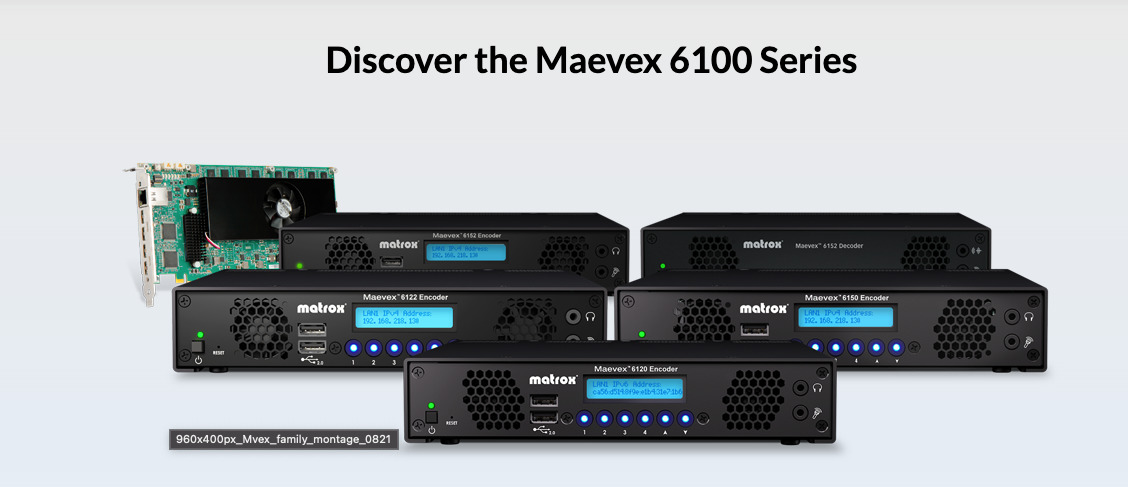
Matrox is a streaming technology company that offers a variety of tools for broadcasters, such as 4k live streaming encoder technology. This brand offers several hardware live streaming encoders, including Monarch HD Encoder Appliance, Maevex 6122 Dual 4K Encoder, and Maevex 6152 Quad 4K Encoder
The live streaming encoders from Matrox are highly capable, so they are well-suited for supporting professional streaming setups. It is a robust hardware encoder for streaming.
Key Features:
- Hardware encoders
- Live stream recording
- 4K encoding and decoding
- Uses H.264 codec
- Large collection of other streaming tools
- Low-latency encoding
- Up to 6 streaming protocols
- Great for streaming on the move
Pros:
- Capable of high-quality streaming
- Many different encoding options
- Dedicated software to support hardware encoders
- Travel-friendly
Cons:
- No pricing transparency
- Complicated array of features not best suited to beginners
Pricing:
Pricing for Matrox live streaming encoders is not available on the Matrox website. Interested broadcasters must inquire about pricing from a verified Matrox distributor.
12. OSX by Streambox

The Streambox OS X Software Encoder is a 4K live streaming encoder tool capable of 4K encoding necessary for producing high-quality live streams anywhere. It is equipped with a variety of professional tools that are designed to enhance the broadcasting experience.
One downside of this software is that it is only compatible with macOS, so it is not an option for Windows users.
Key Features:
- High-quality streaming
- Low data consumption
- Multiple color profiles
- Multi-location video streaming
- Live-to-VOD archiving
- Reliable low-latency streaming
Pros:
- Works on any internet connection
- Saves money on bandwidth
- The software can be upgraded
Cons:
- Has particular system requirements
- Only works on macOS
Pricing:
OS X comes with Streambox Cloud subscriptions. However, there is no further pricing information on its website. For more information, you can contact Streambox directly
13. XSplit Broadcaster
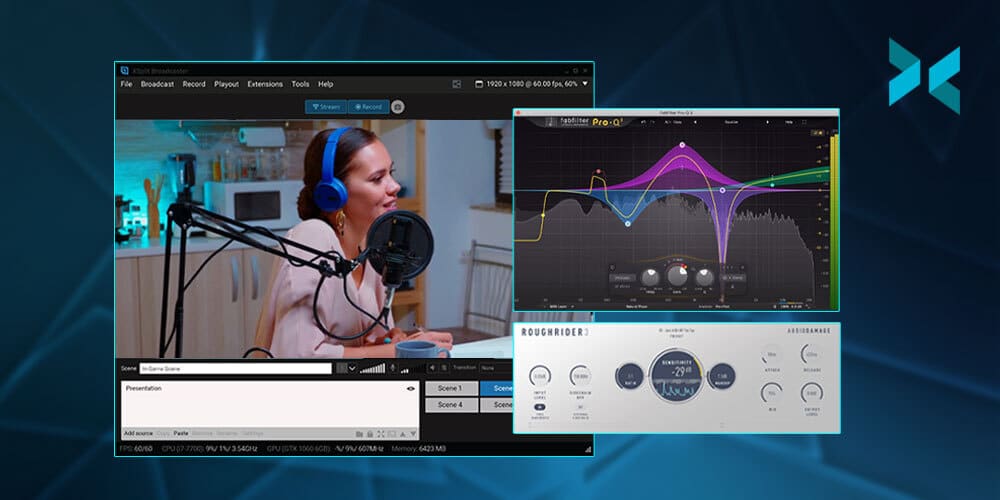
XSplit Broadcaster is an all-in-one tool for content creation, streaming presentations, recording, and broadcasting live events. It offers 4K streaming quality and high-quality live streaming encoding.
It offers unique features like chroma key, scene transitions, thumbnail scene preview, and up to 240 FPS.
XSplit Broadcaster is a popular streaming platform because it offers extensive customization options. To customize your live streams, all you have to do is drag, drop, and resize any media content of your choice. This includes GIFs, images, videos, and web pages.
Another great feature this platform offers is its native plugins and custom RTMP. With this, users can easily stream to top broadcast platforms while simultaneously recording multiple outputs.
That’s not all. You can also add various broadcast effects and animations to make your live streams more interesting. Its media liveshow function makes it easy to loop multiple images or videos for your BRB screen, which will help to keep your viewers engaged.
Key Features:
- Built-in audio mixer and DSP effects
- In-game HUD
- Supports streaming and recording to multiple outputs
- Noise suppression
- Gamepad visualizer and whiteboard
- NVIDIA encoding to enhance streaming performance
- Allows professional scene switching and scene previews
- Allows users to record multiple scenes at the same time to streamline post-production
Pros:
- Supports a wide range of integrations
- User-friendly interface
- Green screen
Cons:
- Limited features in the lower tiers
Pricing:
XSplit Broadcaster offers pricing plans in 2 tiers:
- VCam Premium: $8/month
- Broadcaster Premium: $15/month
14. StreamLabs

Another live streaming encoding software worth trying is Streamlabs. It is built on OBS Studio and is popular among gamers and streamers. Streamlabs offers customization options and supports integrations with a wide range of third-party platforms.
One of the features that makes StreamLabs stand out is its multi-stream function, which allows users to stream to various platforms. These platforms include YouTube, TikTok, Kick, Twitch, Trovo, and other RTMP connections.
If you’re a broadcaster who likes to play around with different themes, stream overlays, and sounds, you’ll find StreamLabs very helpful. It supports custom alerts for notifications from YouTube, Facebook, and Twitch. You can also create a custom tip page that matches your branding using its intuitive drag-and-drop builder.
StreamLabs goes beyond simply being a streaming platform and an encoding software. It offers on-demand printing and global shipping. Therefore, users can create and sell custom merch via their storefront using StreamLabs.
When it comes to audio, StreamLabs also offers multiple options. You can explore its expansive sound library to find various categories of sounds for your live streams. You can get access to free audio files for intermission, alerts, transmissions, intro, and outros.
Key Features:
- Fully customizable alerts
- A wide library of desktop overlays and themes
- Supports multiple webcams and collaborations
- Low latency
- Cross clip for creating short form video clips from livestream recordings
- Dual output
- Provides features for customizable polls, interactive games, and tip trackers
- Seamlessly integrates with Twitch, YouTube, and Facebook
- Chatbot to assist in live stream moderation
- Extensive chat filter options capable of filtering out caps, emotes, links, symbols, words, and paragraphs
Pros:
- User-friendly interface
Cons:
- Watermark in the free plan
Pricing:
StreamLabs offers a free plan and a paid plan.
- StreamLabs Starter: Free
- StreamLabs Ultra: $27/month
How to Choose a Live Streaming Encoder
The live streaming encoder software you should choose greatly depends on the features you need to help you reach your goals. That said, no single live streaming encoder fits every broadcaster.
To identify which features are most important to you, take some time to think about the following questions:
- Is the encoder compatible with your streaming setup?
- What kind of computer will you use, and with what kind of operating system?
Many popular encoding software options, such as OBS Studio, are fully compatible with Windows PC, making them a strong choice for users on that platform.
- How many camera feeds do you need to incorporate into your videos, and which camera will you use?
- What features does the encoder provide? Does it fit your broadcasting needs?
- What’s your budget?
- How big is your target audience?
- How much will you need to do in the way of studio effects or video editing?
- What resolution of video do you want to broadcast?
- What are the top requirements of your live streaming platform service?
If you’re new to live streaming video, we recommend starting with OBS Studio to become familiar with how to stream live video on your website. After you get the basics down, you can upgrade later to a more advanced program if you like.
OBS Studio is a strong starting point because it’s free to use, so you can see results without affecting your budget. vMix and Wirecast are also good starting points, but they cost more. Nonetheless, if you have a wide audience, it might be worth investing in them when you’re starting out.
Overall, it’s important to ensure that any encoder streaming software you choose helps you meet all your goals for producing and broadcasting your video content.
FAQs
1. What is an encoder for live streaming?
In simple terms, a live video streaming encoder is a tool or device that compresses your video signal into a digital stream that can be sent over the internet to a streaming platform. The platform then delivers the stream to viewers’ devices, which decode it for playback.
2. Do I need an encoder for live streaming?
Yes, it’s important to have an encoder for live streaming. Without one, you can’t send your camera’s video to a streaming platform, because the video has to be compressed and packaged first.
3. How much does an encoder for live streaming cost?
Many encoder software options are free or cost under $100, while professional software and hardware encoders cost more, from a few hundred to several thousand dollars. If you stream from a smartphone, the encoder is built into the app.
4. Which free encoder should I use for live streaming?
OBS Studio is a free, open-source option that works with Dacast. It can feel daunting at first, but it becomes easier once you learn the basics.
5. What are the main live streaming encoder options?
The encoders covered in this guide are:
- Wirecast
- Open Broadcaster Studio (OBS)
- VidBlaster
- vMix
- LiveU Solo
- Teradek
- TriCaster
- Niagara Video
- Resi
- Magewell Ultrastream
- XSplit Broadcaster
- Streamlabs
6. What encoder should a church use?
Most churches start with a software encoder such as OBS Studio on a capable computer, and move to a hardware encoder when they want a dedicated, reliable device for weekly services. For more, see our guides to church live streaming software and church streaming equipment.
Conclusion
Today’s broadcaster needs to deliver on multiple fronts, and having the right live streaming encoder can help you do that better and streamline your entire production operation.
The live streaming encoder that you choose ultimately plays a huge role in the quality of your live stream. When choosing one to operate your live stream, there are many options and live encoder configurations. Hardware encoders are built for reliability, while video encoders for live streaming software are easier to use and more cost-effective.
Overall, it’s important to ensure that any live stream encoder software you choose, as with your hardware, your cameras, and your live streaming platform, allows you to meet your goals for producing and broadcasting your video content.
If you are looking for a unified streaming solution with both live and VOD streaming capabilities, give Dacast a try. Sign up for our 14-day free trial to test out all of our streaming tools. No credit card is required.
