



Best Video Codec for Web Streaming in 2026: AV1 vs H.264 vs HEVC (Quality + Bandwidth)

Choosing the right video codec for web streaming is one of the fastest ways to improve video quality, reduce buffering, and lower bandwidth costs—without changing your cameras, CDN, or player.
In 2026, there isn’t a single “best codec” for every business. The best codec depends on what you’re optimizing for:
- Maximum reach (every device plays it): H.264
- Best compression efficiency (save bandwidth at the same quality): AV1
- Strong efficiency inside Apple-heavy audiences: HEVC (H.265), with licensing considerations
AV1 adoption is accelerating (Netflix reported AV1 powers ~30% of its streaming as of Dec 2025). Browser support for AV1 continues to expand, but playback can be hardware-dependent. On Apple-heavy audiences, AV1 support is often limited to devices with an AV1 hardware decoder, so many teams use AV1 where supported and H.264 as a fallback.
TL;DR :
- If you want the safest “plays everywhere” choice: use H.264 (still the universal baseline).
- If you want the best bandwidth savings at the same visual quality: prioritize AV1 where supported, with H.264 fallback.
- If your audience is heavy on Apple devices / Safari ecosystems: consider HEVC (H.265) if licensing fits your business, plus an H.264 fallback.
- Best practice for most businesses: deliver multiple renditions (ABR ladder) and multi-codec (AV1/HEVC + H.264 fallback) rather than betting on one codec.
Table of Contents
- What is a Video Codec?
- What is the Best Video Codec for Streaming?
- How Codec Settings Affect Video Bandwidth
- How Businesses Can Choose the Right Video Codec
- Next Generation Codecs
- Emerging Trends in Video Streaming and Content Creation
- FAQs
- Conclusion
What is a Video Codec?
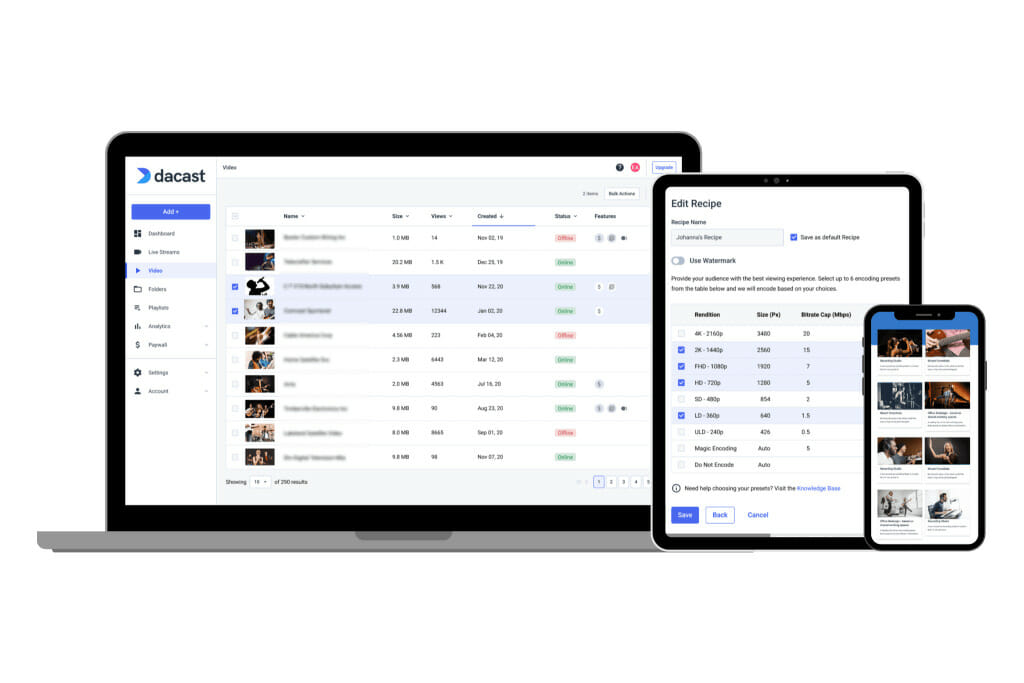
Video codecs make web streaming possible by compressing large video files into sizes that can be delivered smoothly over the internet. When you record a video, you’re essentially capturing a series of still images displayed in rapid succession. For example, at 30 frames per second (fps), you’re recording at least 30 images every second. The higher the fps, the more images are recorded for each second, resulting in large file sizes.
This large volume of images and accompanying audio can quickly consume significant storage space. Video codecs, short for “coder-decoder,” were developed to manage this. A codec compresses large video files, making them smaller and easier to store and transmit without losing too much quality.
So, how does a codec work?
At its core, a codec is a video compression method. It reduces the size of a video file by eliminating certain data that isn’t necessary while aiming to preserve visual quality. In other words, it “squeezes” the video down to a smaller file size, enabling faster streaming and reduced bandwidth consumption.
Once the compressed file is sent from your server to a Content Delivery Network (CDN) and then to the viewer’s device, the best video decoder on their device will decode the file, allowing them to enjoy the video stream.
How Modern Video Codecs Work
Modern video codecs are designed to compress large video files into smaller, more manageable sizes while maintaining high-quality output. They use algorithms to analyze frames and remove redundant data, encoding only the essential information. This reduces the file size and enables high-quality video streaming with lower bandwidth usage.
H.265 (HEVC), known as High-Efficiency Video Coding, is one of the fastest and most efficient codecs. It delivers high-quality video at lower bitrates, making it ideal for streaming 4K and HD content. Another popular codec is AV1, an open-source codec that offers even better compression than H.265, further improving video streaming performance.
Video file compression isn’t just about reducing size. Modern codecs use complex mathematical techniques to achieve efficiency. They analyze which parts of a video remain static from frame to frame and discard unnecessary information. Other methods look at how images move across frames, using predictive algorithms to minimize data storage without sacrificing quality.
Technical methods like chroma subsampling, quantization, and spatial/temporal downsampling are all part of this process. While these terms may sound complex, they essentially refer to the advanced equations and methods running behind the scenes, making sure your files are small enough for smooth streaming.
There are many types of video codecs, each tailored for different types of broadcasting. Codec technology continues to evolve, with ongoing improvements to ensure optimal streaming quality and performance.
What is the Best Video Codec for Streaming?
The best codec depends on your priority. H.264 is still the safest default for universal playback, while AV1 typically delivers the best bandwidth savings when the viewer’s device/browser supports it. For Apple-heavy audiences, HEVC can be a strong option—most teams still keep H.264 as a fallback to avoid playback gaps.
H.264: An Overview
H.264 has been the de facto standard for internet video delivery for over a decade, and its continued development makes it a reliable choice for streaming. It was initially developed in the early 2000s and has seen continuous updates. Today, it remains one of the best video codecs for streaming due to its widespread support and efficient compression.
Any device built in the past ten years likely supports H.264 advanced video coding, which is crucial for its success. This wide compatibility means that any video encoded with H.264 can be streamed on laptops, desktops, smartphones, tablets, smart TVs, gaming consoles, and more. The high device compatibility makes H.264 a solid choice for content creators looking for a reliable video codec.
Additionally, H.264 delivers relatively small file sizes compared to older codecs like H.263 and MPEG-2. This reduction in file size—about 50% smaller than previous generations—helps conserve both storage and bandwidth, making it efficient for streaming and downloading.
Although newer advanced video codecs like H.265 (HEVC) offer better compression and quality at lower bitrates, H.264 still holds a significant advantage due to its broad compatibility across devices and platforms, making it the most practical option for high-quality video streaming.
H.264 Encoder Profiles
The H.264 codec has gone through several iterations and updates. It isn’t a single, monolithic standard. Instead, it’s a “family” of standards with multiple encoder profiles that offer varying levels of performance and file size.
There are at least 20 profiles available for H.264. However, most of those are very specialized. Most encoding software only uses a small number of these profiles. That is why it is essential to understand some of the differences among H.264 encoders.
These more commonly used H.264 encoder profiles are baseline, main, and high.
1. Baseline Encoder Profile
The baseline profile uses only the older, most widely supported compression features of H.264. This means that video compressed using the H.264 codec, the baseline profile, will be compatible with almost all devices. This includes older and low-power devices.
However, videos compressed with this profile may have larger file sizes, which can be a downside.
It’s worth noting that the baseline profile is not recommended for the Dacast OVP, as it is outdated and less efficient than newer profiles.
2. Main Encoder Profile
The main profile adds more encoding features, which reduce file sizes and improve quality but require more processing power for decoding. Older devices (such as smartphones or tablets from 5-8 years ago) may struggle to decode videos encoded with this profile. If file size is a concern, the main profile offers a good balance between compatibility and compression.
3. High Encoder Profile
The high profile is the most modern and efficient version of H.264, enabling better compression and smaller file sizes. However, it demands more processing power from the viewer’s device.
Fortunately, this is no longer a major issue, as most modern devices support the high profile. This profile is ideal for best video quality, providing the most efficient compression while maintaining excellent visual fidelity.
Which H.264 Encoder Profile to Use
The baseline profile is the safest choice if you’re targeting users on older, low-powered devices. However, for most viewers using modern devices, the high or main profile should be sufficient and offer better video quality and smaller file sizes.
In summary, H.264 remains one of the best video codecs for streaming in 2026, particularly for its balance of efficiency, compatibility, and quality. If you’re looking for a more efficient codec with better compression, consider H.265 or AV1, but remember that H.264 will likely continue to be the go-to codec for a broad audience.
Other H.264 Settings

Any video stream or file can be encoded using various live video format options. When setting up your H.264 encoder, especially for streaming to an HTML5 video player, there are several key settings to configure for optimal performance.
Resolution
Video resolution refers to the size of the video, measured in pixels. For example, a standard HD video frame is 1920 pixels wide by 1080 pixels high. For 4K video, the resolution is four times the dimensions of HD, offering a much sharper and more detailed image.
Frame Rate
Video is composed of a series of still images, with the frame rate representing the number of pictures displayed per second. The most common frame rate for streaming is 30 frames per second (fps). Higher frame rates, such as 60 fps, are often used for smoother motion in fast-action content.
Bitrate
Video bitrate refers to the amount of data included in the video, measured in kilobits per second (kbps) or megabits per second (Mbps). Higher bitrates result in better video quality, as more data is used to encode the video.
For streaming HD 1080p video, a bitrate between 1500 kbps and 4500 kbps is typical. For 4K video, bitrates can go even higher to maintain quality. It’s important to choose an appropriate bitrate to balance quality and streaming performance.
Audio Codec
While H.264 is the most commonly used video codec, the audio codec also plays a crucial role in streaming. AAC (Advanced Audio Codec) is generally considered the best audio codec for streaming because it provides high-quality audio at lower bitrates. MP3 is another common audio codec, but AAC tends to offer better efficiency and quality. If you’re aiming for professional-grade audio, you might opt to use separate video and audio codecs.
Audio Bitrate
Similar to video bitrate, audio bitrate affects the quality of the sound. Audio bitrates typically range from 32 kbps (suitable for voice-only content) to 128 kbps (for music or high-quality audio). For optimal audio quality without excessive bandwidth usage, 128 kbps is recommended. If you’re after an even crisper sound, you can go for 256 kbps, though this will consume more bandwidth.
Keyframes
We recommend setting the keyframe interval to 2 seconds for optimal streaming performance. Keyframes are the reference frames in video compression that help maintain video quality, especially during fast action scenes. A shorter keyframe interval ensures smoother video playback.
How Codec Settings Affect Video Bandwidth

Codec settings directly control quality, bitrate, and buffering risk. Use this quick checklist to keep streams smooth:
- Resolution: Lowering 1080p → 720p is often the fastest way to reduce buffering.
- Frame rate: Use 30 fps for most content; use 60 fps mainly for sports/esports.
- Bitrate: Set a realistic bitrate and build an ABR ladder so viewers can adapt.
- Keyframe interval: 2 seconds is a common default for HLS workflows.
- Audio: AAC + ~128 kbps is a solid baseline for clear speech and low overhead.
How Businesses Can Choose the Right Video Codec
1. Playback compatibility (reach)
Ask: “What percent of our viewers must play flawlessly?”
- If the answer is “basically everyone,” H.264 remains essential.
- If you control devices (enterprise internal comms, apps, kiosks), you can be more aggressive with AV1/HEVC.
AV1 support is broad in modern browsers but can be hardware-dependent—especially on Apple devices where support is often listed as partial in common compatibility trackers.
2. Bandwidth cost (efficiency)
Ask: “Is bandwidth a top-3 cost driver for us?”
If yes, AV1 is increasingly compelling for large-scale delivery—major platforms continue expanding AV1 usage.
3. Encoding cost (compute + workflow)
Newer codecs can cost more to encode (time/CPU/GPU). For live streaming, that can mean:
- More expensive hardware encoders / GPUs
- Higher power draw
- More complexity in your encoding ladder
4. Licensing and legal constraints
Licensing can affect total cost. HEVC (H.265) may involve multiple licensing programs/pools, which can add complexity for some organizations. AV1 is typically favored when teams want a more straightforward royalty-free path.
5. Future-proofing (without breaking playback)
The safest “future-proof” strategy isn’t betting on one codec—it’s using multi-codec delivery and ABR.
Next Generation Codecs to know in 2026
With evolving video streaming technology, the codecs powering our video content are constantly improving. While H.264 remains a dominant choice for web streaming, newer codecs like H.265, AV1, H.266/VVC, and other emerging codecs are making their way to the forefront. Each codec has its strengths and is suitable for different streaming needs, whether you’re focusing on high-quality video for 4K streaming, low-latency performance, or efficient bandwidth management.
Let’s explore some of the leading video codecs and what the future holds for video streaming in 2026.
H.265
H.265, also known as HEVC (High-Efficiency Video Coding), is poised to replace H.264, an older video streaming protocol, due to its superior compression capabilities. H.265 offers up to twice the video quality of H.264 at the same bitrate, making it ideal for ultra-high-resolution 4K video streaming. While H.265 is already being adopted for 4K streaming, it does require more processing power, which could limit its widespread adoption across all devices.
At this stage, H.265 isn’t supported universally, and many older devices cannot decode HEVC video. However, it remains a promising codec for future-proofing high-definition content and professional streaming. If you’re streaming beyond 1080p and want improved video quality, H.265 is a strong choice. The MP4 format works well with this codec, offering efficient streaming for professional live events.
H.266/VCC
H.266 (also known as VVC or Versatile Video Codec) is an emerging codec designed for ultra-high-definition streaming, including 8K and 360° immersive video. This codec offers 30-50% better compression efficiency compared to its predecessors, making it ideal for high-resolution content.
Despite its potential, H.266/VVC is still in its early stages, and support across devices and platforms is limited. The specialized hardware required for encoding and decoding H.266 further restricts its adoption. However, as streaming technology evolves, VVC could become a dominant codec for future video streaming, offering exceptional video quality with efficient data compression.
VP9

While the H.26x family remains dominant, VP9 offers a compelling alternative, particularly for high-resolution streaming.
This advanced codec is widely used by YouTube and has been tested by Netflix, proving its efficiency in delivering high-quality 4K content with improved compression. As an open-source format, VP9 provides flexibility and customization, making it an attractive option for platforms seeking cost-effective, high-efficiency video encoding.
However, VP9 is still not universally supported for live streaming. Due to limited adoption across streaming technologies and hardware, it may not be the best choice for real-time broadcasting at this time.
AV1
AV1 is a next-generation codec gaining traction due to its open-source nature and superior compression efficiency compared to older codecs like H.265. Platforms like Netflix and YouTube have already adopted AV1 to reduce data usage while maintaining high video quality. It’s quickly becoming a preferred codec for high-quality video streaming due to its ability to deliver efficient video compression and improved bandwidth management.
The news is that AV1 is expected to become one of the best video codecs for streaming in 2026, especially as its support expands across devices and browsers.
Emerging Trends in Video Streaming and Content Creation
1. Content-adaptive / AI-assisted encoding
More teams are using smarter encoding approaches that adapt to content complexity (e.g., action vs talking head) rather than using one-size-fits-all settings. (Netflix’s AV1 updates reflect how central efficiency strategy has become.)
2. Hardware decoding as a “hidden requirement”
Codec success increasingly depends on whether consumer devices can decode it efficiently (battery, heat, performance). This is one of the biggest real-world constraints on AV1 rollout.
3. Higher-quality expectations: 4K, HDR, immersive formats
More streaming stacks must handle HDR and higher resolutions—raising the value of efficient codecs, ABR ladders, and better per-title encoding decisions.
FAQs
1. What is the highest quality video codec?
H.266/VVC (Versatile Video Coding) offers the highest quality for ultra-high-definition content, including 8K and immersive 360° video, with 30 to 50% better compression efficiency than its predecessors.
2. Is AV1 better than H.265?
Yes, AV1 is generally considered better than H.265, offering superior compression efficiency, reduced data usage, and better video quality, making it a popular choice for streaming platforms like YouTube and Netflix.
3. What is better: H.264 or H 265?
H.265 (HEVC) offers better compression efficiency and video quality than H.264, especially for high-resolution content like 4K. However, H.264 is more widely supported across devices and platforms.
4. Which codec is best for MP4?
H.264 is the most commonly used and compatible video codec for MP4, providing a good balance of quality and file size for a wide range of devices and platforms. However, if you prioritize better compression and higher quality, H.265 or AV1 can be better choices, especially for 4K video streaming.
5. What is the best video compression format for 2026?
There are several options among the best video compression formats. H.265 (HEVC) is a great option for 4K/8K streaming with strong device support, while AV1 is more efficient than H.265 but with limited hardware support. H.264 (AVC) is still widely used due to its universal compatibility, whereas VVC (H.266) is the next-gen codec with 50% better compression than H.265.
6. What is the best video codec for live streaming?
H.264 remains the best option for live streaming due to universal support and efficient encoding. However, H.265 and AV1 offer better compression for higher-quality streaming at lower bitrates, making them ideal for platforms that support them.
7. Which video codec is best for YouTube?
YouTube uses AV1 for 4K and higher resolution videos due to its better compression efficiency, while H.264 is still widely used for lower resolutions and general video uploads.
8. What is the future of video codecs?
The future of video codecs will see wider adoption of AV1, H.266/VVC, and AI-powered encoding techniques. These technologies will drive more efficient compression, improve video quality, and support new formats like 8K and immersive video.
Conclusion
H.264 remains the best video codec for streaming due to its unmatched compatibility and balanced approach to quality and compression. As one of the most widely supported video codecs, H.264 seamlessly integrates across streaming platforms, ensuring consistent and reliable web broadcasting.
Newer, more efficient video codecs like AV1 and H.265 offer advanced compression capabilities. However, H.264 continues to be the preferred choice for most users because of its accessibility and fast processing speed.
At Dacast, we understand the importance of flexibility in video encoding. As a leading streaming platform, Dacast supports a variety of video codecs to guarantee fast and reliable performance. We provide robust support for cutting-edge video encoder formats to deliver smooth, high-quality streaming experiences. Whether you’re focused on the latest video codecs or prioritising compatibility, Dacast ensures your content is effectively delivered across all devices, offering professional-grade service and flexibility.
Dacast’s tools allow broadcasters to use the fastest and most efficient video codecs while maintaining top-notch performance. Whether you need a versatile video codec pack or are looking to explore advanced video codecs, Dacast provides the optimal solutions for your streaming needs.
You can try Dacast and all its features right now for free.
For regular tips on live streaming, you’re welcome to join our LinkedIn group.
Thanks for reading, and good luck with your broadcasts!
